Walletconnect Protocol
WalletConnect
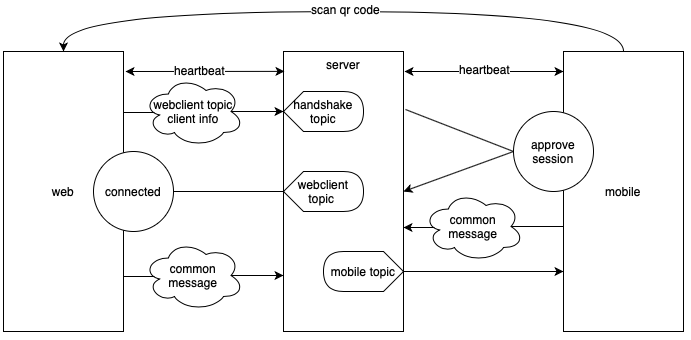
The protocol was designed to connect the web application and wallet app via a websocket bridge server, such that both sides have the ability to send and receive message from the other side.
How the web app and wallet app make connection to each other
(Image credit: https://docs.vite.org/go-vite/articles/vite-connect.html)
Another one:
(Image credit: https://docs.walletconnect.com/1.0/tech-spec)
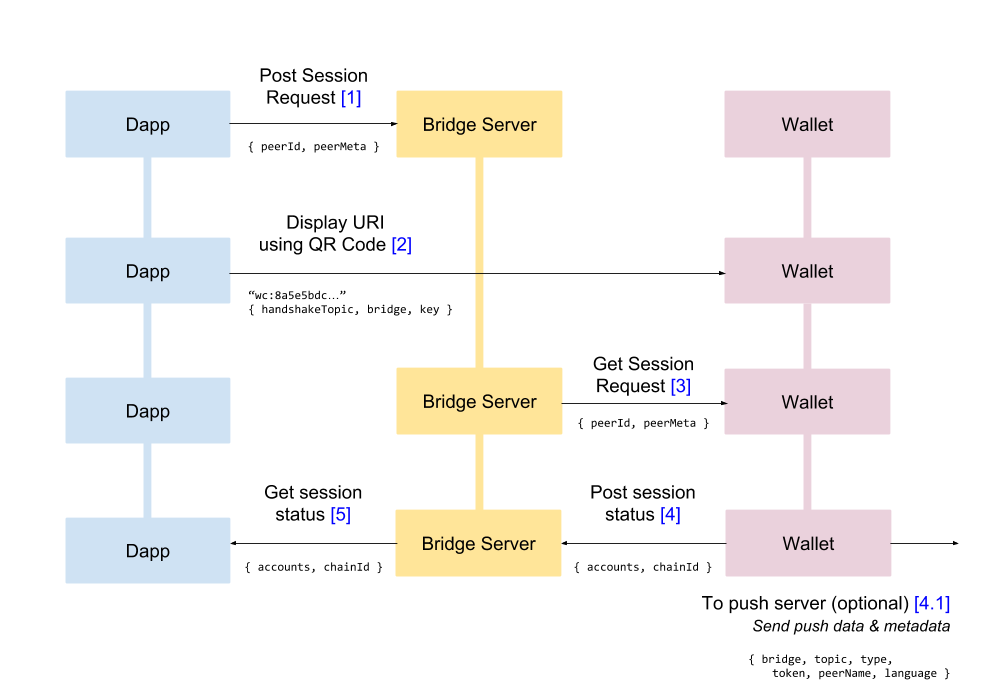
We need to learn how the bridge server (in the middle of the picture) works before we get into the details.
Bridge Server
The bridge server is a “topic” based pub/sub server. The web app and the mobile app can both generate some random topic ID (e.g. UUIDv4) and send to the bridge server, tell the bridge server which topic it wants to publish or subscribe to.
Any random string can be used as a “topic”. Web app will generate a random string as its own web-app ID, then use it as a “topic” string and send to the bridge server, then subscribe to messages that published to that topic. Same to the wallet app side. Wallet app can generate a random string as its own ID and send to the bridge server.
Bridge server essentially contains 3 maps:
- 1st map: topic -> a list of subscriber connections
- 2nd map: topic -> a list of unsent messages
- 3rd map: topic -> a list of http endpoint (web hooks) as “notifier”
When the web app and mobile app send message to the bridge server, the message structure is like this:
1
2
3
4
5
6
7
8
9
10
{
Topic: xxx,
Type: pub|sub,
Payload: empty or {
data: <encrypted data>,
hmac: <hmac of the data>,
iv: <iv used to encrypt the data>
},
Silent: true|false
}The message inside payload is encrypted and signed with hmac-sha256 algorithm, and only the web app and mobile app has the key, so the bridge server can’t see the payload content, it just relays the whole message to both sides.
When one side publishs a message to a topic to the bridge server:
- if there are already some subscribers subscribed to that topic (check the 1st map), then the bridge server will grab those subscriber’s websocket connections from the 1st map, then broadcasts this message to each of them with something like
conn.WriteMessage(msg) - if there are no subscribers to that topic, then the bridge server will save this message to the 2nd unsent map
- if the published message has the field with “Silent: false”, then the bridge server will find a list of http endpoint from the 3rd map (if any), then send a http post request with the topic ID to all of the endpoints.
- if there are already some subscribers subscribed to that topic (check the 1st map), then the bridge server will grab those subscriber’s websocket connections from the 1st map, then broadcasts this message to each of them with something like
When one side subscribes to a topic:
- bridge server adds the client connection to the 1st map, and
- check if there are some unsent messages in the 2nd map. If there are some, then bridge server immediately send all unsent message to that subscriber client, and clear the unsent map entry, i.e. “topic id -> []”
The bridge server also provides a
/subscribehttp point, which takes a topic id and webhook url as parameter. When received such request, bridge server will add this webhook url to the 3rd map
Handshake Process
Now we know what the bridge server does, let’s see how these 2 sides get connected:
- The web app/client generated an ID and a handshake topic, both use UUIDv4 and it will be used as “topic” in the bridge server. For convenience, we will use the “web-client topic” and “handshake topic” for them in the following content.
- The web client display a QR code which contains the “handshake topic”, “bridge server url” and “encryption key”
- The web client sends a “pub” type message with the topic as the “handshake topic” and some “connect request” + “web-client topic” data as the payload to the bridge server, wait for the wallet mobile app to get this message; it also sends a “sub” type message to the “web-client topic”, wait for some messages sent to it.
- Now the wallet mobile app scans the QR code, parse it to get the handshake topic, encryption key and connects to the bridge server, then take the “connect request” data from the “handshake topic”. After decrypting the message with the key, the wallet mobile app will be able to get the “web-client topic”. Subsequent messages to the web client will be sent via this “web-client topic”.
- The wallet mobile app then sends an “approve connect” response message to the web-client topic, and the message’s payload carries the wallet account public address and the wallet mobile app’s ID (also UUIDv4), this ID will be further used as “wallet topic”. The wallet app will also send a “sub” type message to this “wallet topic”, wait for some messages sent to it.
- Since web client is subscribing to the “web-client topic”, it will receive this “approve connect” message. After decrypting it, the web client will be able to get the “wallet topic”. Further messages to the wallet mobile app will be sent to this “wallet topic”.
Handshake Message Details
Step 1
Web page shows “Connect to Wallet” button, when user click it on the web page, the web client will connect to walletconnect-bridge server via WebSocket, and send 2 messages:
Message 1
1 | { |
This topic is the handshake topic, the payload data contains a handshake request, and inside the request, it contains the data web-client Topic (see below). You can see the Type is “pub” here, means this is message web-client published to this Topic “410f….b40a”
Message 2
1 | { |
This topic is web-client Topic. The “Type” is “sub” here, means now the web-client subscribe to messages that published to Topic “09e0 … aabf”
Show QR Code
When the “Connect to Wallet” button gets clicked, the web page will also show a QR code, which is a string like this:
1 | wc://410fd933-b5e4-426c-addd-ae0e9aeeb40a@1?bridge=<bridge server url>&key=<key> |
The “410fd933-b5e4-426c-addd-ae0e9aeeb40a” is the handshake topic; @1 means it is using walletconnect protocol version 1; bridge url is the walletconnect bridge server url; the key is the key used to encrypt message b/t web and wallet app (w/ AES encryption algorithm)
Step 2
Wallet App get the “connect request” message
Now the wallet app scan this QR code, parse the “wc://…” url above, it will get these 3 parts:
- walletconnect bridge server url: now the wallet app can connect to this server via websocket protocol
- handshake topic: once connect to the bridge server, the wallet app will try to get message from the handshake topic
- encryption key: can decrypt the message once get message from the bridge server, or encrypt message when need to send message back to the web client
At this step, the wallet app send a message like this to the bridge server:
1 | { |
which means, it now subscribes to the “410f … b40a” handshake topic, and will receive messages that published to that topic. And because in step 1, web-client already published a “connect request” message to that handshake topic, the wallet app now immediately fetched that message and use the encryption key to decrypt the payload.
From the payload, it knows that 1) this is a “connect request” message 2) the web-client topic (“09e0 … aabf” in the above example), the wallet app will now display a modal showing something like: “https://abc.com wants to make a connection, choose your account to connect”.
Wallet app send the “Approve” response
Once use chose an account and click “Approve”, the wallet app will send the following message to the “web-client Topic” (09e0 … aabf). The message’s payload will include wallet’s account public address and a “wallet Topic” string:
1 | { |
Please notice in this step, the wallet app can send any “public address” back to the bridge server, there is no “signature” required in this step, means even when the web-client gets this address, the web-client cannot treat the scanner really “own” this account. Thus, for example, shouldn’t show any credentials related to this account in the web system.
The wallet app will also send another message to subscribe messages published to the “wallet Topic”, such that when there is message sent to this Topic, the wallet app can immediately get it.
1 | { |
Here “39CFD5EF-4619-418F-A68F-6FDE40CA183A” is the “wallet Topic” that the wallet app subscribe to.
:warning: Seems it will also send an extra message to the web-client to show the wallet-app actually accept it, but I don’t see why this is necessary, b/c the “accept” info should already be put in the “approve” response:
1 | { |
From walletconnect’s official doc, I can only find the Type as “pub” and “sub”, didn’t find the “ack” type.
Step 3
Since the web-client is subscribing to the “web-client Topic” in the first step, the web-client now will receive the “Approve” response message sent from the wallet app in the 2nd step. Now the web-client can use the encryption key to parse the response message to get the wallet account and the “wallet’s Topic”
Now the handshake process is done:
- The web-client can send message to the wallet app via the “wallet’s Topic” (since the wallet app is subscribing it)
- The wallet app can send message to the web-client app via the “web-client Topic” (since the web is subscribing it)
And you can see in the above process, the handshake topic has only been used once. Once both sides know each other’s message Topic, the handshake Topic won’t be used anymore. This is for security concerns:
Connect session request is sent and consumed only once, thus ensuring that even if the contents of handshake topic and encryption key in the QR code are leaked, the attacker cannot access the private topics of the two parties.